Virtual assistance in the age of AI
We all remember asking our smartphones to set a ten-minute pasta timer or check the morning weather. For years, that was the ceiling for an ai virtual assistant—a simple tool that followed basic voice commands to perform rigid tasks. Today, however, that technology has moved out of the kitchen and into the office. Modern systems have evolved from simple command-and-response bots into creative collaborators capable of drafting messages, summarizing long documents, and organizing your busy week.
Imagine having a tireless personal intern who reads faster than humanly possible and eagerly handles your most tedious chores. According to recent tech industry surveys, millions of everyday professionals are now using virtual assistance ai precisely this way. Instead of just searching the web for a dinner recipe, this new generation of artificial intelligence can plan a full week of meals based strictly on what is already sitting in your fridge. It marks a massive shift from simply asking a machine for information to asking it to do actual work.
Have you ever stared at a blank screen for twenty minutes trying to start a polite but firm email? Handing that mental burden over to your new digital intern is where the real magic happens. By learning to collaborate with these modern tools, you can reclaim hours of free time and drastically reduce your daily cognitive load.
The Great Evolution: Why Command-Based Bots are Retiring for Generative AI
Early digital assistants often caused frustration by trapping users in an endless loop of “I didn’t quite catch that.” Older systems operated like a standard vending machine: if you didn’t press the exact right button, nothing happened. These command-based bots relied on rigid, pre-written rules, making them incredibly fragile and easily confused by natural human conversation.
Today’s technology completely flips that script through Generative AI. Instead of pulling from a limited list of programmed responses, modern assistants use Large Language Models (LLMs). These are powerful systems that have scanned billions of websites to learn how we communicate. Much like knowing the word “jelly” usually follows “peanut butter and,” these models don’t retrieve static files; they predict the most likely next word based on massive pattern recognition.
Because they create fresh text on the fly, comparing conversational AI vs traditional chatbots feels like the difference between collaborating with a sharp intern and yelling at a brick wall. You can use messy phrasing or change the subject entirely, and the predictive capability allows the system to adapt seamlessly to shifting contexts.
How AI ‘Thinks’ Without Actually Having a Brain: NLP and NLU Simplified
Even a text message filled with typos and slang is easily understood by a close friend. AI achieves a similar conversational grace through Natural Language Processing capabilities. Think of this technology as a digital translator that breaks down our messy human phrasing into computer-readable data. But simply reading words isn’t enough; the system also relies on Natural Language Understanding performance to grasp your actual intent, quickly realizing that saying “I’m freezing” means you want the thermostat adjusted rather than a medical diagnosis.
Despite this impressive comprehension, these assistants do not actually possess factual knowledge. Instead, they rely on advanced pattern recognition to convincingly mimic human speech. Because their primary goal is to generate a fluent response, they sometimes act like a “Confident Storyteller” taking an oral exam they didn’t study for. The AI prioritizes sounding correct over being accurate, effortlessly stringing together highly probable words that look incredibly believable but might be completely invented.
Recognizing this blind spot transforms you from a casual user into an informed collaborator. Delegating the right kind of work requires accepting that AI is a brilliant pattern-matcher rather than an infallible encyclopedia.
Turning To-Do Lists into Done Lists: How to Automate Repetitive Daily Tasks
Staring at a daily to-do list can often feel like looking at a mountain you must climb before breakfast. While writing down your goals is an excellent start, the real secret to efficiency lies in knowing what to hand off. Think of your AI assistant as a tireless digital intern eager to take over the chores that drain your mental bandwidth. Learning how to automate repetitive daily tasks relies on simple task delegation logic: you keep the complex, creative decisions, while the artificial intelligence handles the tedious groundwork.
Mastering this hand-off means recognizing exactly which chores belong on the computer’s desk. Following the best practices for digital task management, here are 5 daily tasks perfect for AI delegation:
- Email sorting (categorizing urgent messages)
- Calendar sync (finding overlapping free time)
- Summary drafting (creating a 30-second meeting summary)
- Research (simplifying complex reading material)
- Grocery planning (turning recipes into shopping lists)
For instance, you can ramble a messy voice note about an upcoming project while walking the dog, and the assistant will instantly organize it into a structured action plan, easily reducing your daily administrative load by 40%.
Reclaiming those lost hours completely shifts how you approach your week. Instead of spending mornings organizing scattered thoughts, you step into a day where the heavy prep work is already finished.
Your New Voice-Activated Productivity Stack: Beyond Just Setting Timers
Modern ai virtual assistant tools have evolved far beyond basic kitchen tricks. The real breakthrough happens when you stop using voice commands merely to trigger actions and start using them to think out loud. Shifting from a rigid “command” mode into a fluid “dialogue” transforms your device from a digital stopwatch into a responsive sounding board.
Making this leap introduces a voice-to-logic workflow, meaning the system doesn’t just transcribe your words—it organizes your underlying intent. Imagine rambling an unstructured idea for a project while driving. Modern voice-activated productivity software instantly captures this messy brain dump, extracts the key action items, and seamlessly integrates them directly into your professional software, fully formatted and ready to use.
Embracing this spoken collaboration speeds up your initial drafting by three times, turning a tedious twenty-minute typing session into a quick five-minute chat. You no longer stare at a blank screen; you simply edit a polished document your assistant built from your spoken thoughts.
Proactive vs. Reactive Support: Letting AI Anticipate Your Needs
Most of us are used to waiting for a problem to arise before asking our devices for help. When exploring proactive vs reactive digital support, the difference ultimately comes down to who starts the conversation. In a traditional reactive system, you ask a specific question and the AI answers. However, because your various apps are now securely syncing data behind the scenes, modern assistants can analyze your routines to anticipate what you will need next.
Picture waking up to a notification suggesting you pack a rain jacket before leaving the house. The assistant didn’t just read the morning weather report; it proactively cross-referenced a forecasted storm with an outdoor coffee meeting scheduled on your synced calendar. By allowing these automated “scout” behaviors, your AI acts as a helpful radar, scanning your upcoming day to prevent forgotten tasks or unexpected scheduling conflicts before they ever happen.
Experiencing this shift completely reduces your daily mental load. Trusting the system to actively monitor logistical blind spots ensures that minor details no longer consume your attention.
The ‘Digital Intern’ Workflow: Integrating Intelligent Agents into Your Professional Life
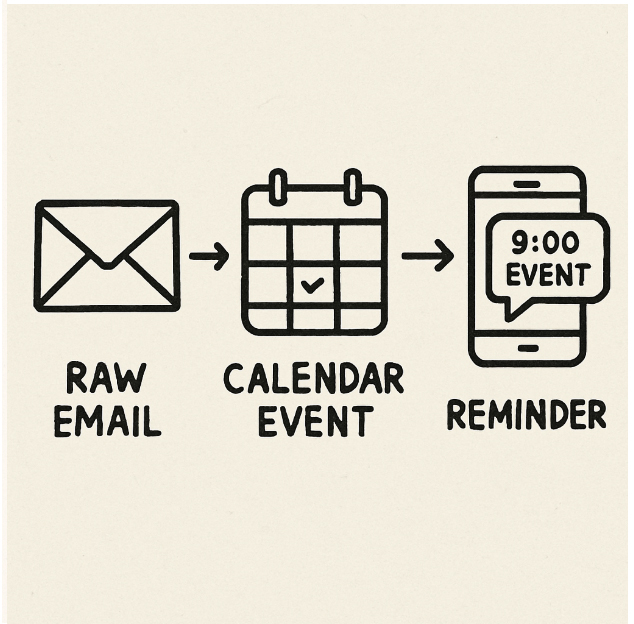
Bouncing between notes apps, email inboxes, and calendars to organize a single project creates unnecessary friction. Instead of treating your AI as a basic question-and-answer machine, you can use it to connect these scattered pieces. This process, called workflow chaining, turns your assistant into a digital intern acting as the glue between apps. By leveraging cloud-based automation tools, you eliminate manual copying and pasting, drastically reducing the mental exhaustion of multi-app context switching.
To get the best results, you need to guide the AI using a “Chain of Thought” approach—breaking a large job into smaller, logical steps. Rather than giving a vague command, you can build a seamless, multi-step routine:
- Capture: Speak or type a raw brainstorm of your project ideas.
- Summarize: Ask the AI to condense those rambling thoughts into clear bullet points.
- Action Item: Have the assistant identify the most critical next step.
- Calendar Invite: Direct the AI to automatically schedule a block of time to complete that specific task.
Mastering intelligent agent workflows shifts the focus from managing software to directing outcomes, allowing the technology to handle complex administrative chains.
Real-Time Translation: How AI Assistants Erase Language Borders in Seconds
Stepping off a plane in Tokyo without speaking Japanese used to mean awkwardly flipping through a phrasebook. Today, the smartphone in your pocket acts as a fluent, invisible interpreter. By utilizing real-time language translation features, your AI assistant listens to a foreign language and instantly speaks the English response back to you. It transforms a stressful encounter into a seamless conversation, immediately boosting your travel confidence.
This capability extends beyond spoken conversations, fundamentally enhancing user experience with smart technology. When faced with a confusing foreign train schedule, simply pointing your phone’s camera at the document magically rewrites the text into your native language. Unlike older tools that translated word-by-word into awkward nonsense, modern AI analyzes context. It understands the actual meaning behind phrases, delivering natural-sounding results that capture local nuances flawlessly.
Beyond vacation survival, instant cross-cultural communication allows you to effortlessly email overseas clients or read international news. Whether parsing an overseas contract or navigating a foreign city, modern translation tools erase traditional language barriers entirely.
The Art of the Prompt: Getting the Most Out of Machine Learning Personalization
Receiving a generic, unhelpful block of text after asking an AI to organize a trip is a common frustration. That happens because modern AI acts like an eager but inexperienced digital intern. To truly benefit from machine learning in personal organization, you must move beyond simple commands and master the “prompt”—the specific instructions you type into the system.
Instead of submitting a vague request like “plan my week,” you can eliminate useless responses by applying the Prompt Pyramid. This straightforward technique is one of the most essential best practices for digital task management, helping you get exactly what you need on the first try. Before hitting send, ensure your instruction includes these three components:
- Role: Tell the AI who to be (e.g., “Act as a family nutritionist”).
- Task: State your goal clearly (“Create a five-day dinner menu”).
- Constraint: Set specific boundaries (“Use bullet points and only include meals that take under thirty minutes to cook”).
Setting clear boundaries allows the system to spend less time guessing and more time generating highly customized, useful output.
Why AI Hallucinates: Dealing with the ‘Confident Storyteller’ Problem
Just like a person confidently embellishing a story, modern AI can produce a phenomenon called a “hallucination.” Because these tools predict the next logical word rather than referencing a factual database, they prioritize sounding fluent over being accurate. When evaluating Natural Language Understanding performance, experts note this tendency turns the AI into a confident storyteller. If it lacks a specific answer, it simply weaves a highly plausible, realistic-sounding guess.
Protecting yourself from these convincing fictions requires a straightforward verification habit. First, lean on AI for low-risk tasks like brainstorming gift ideas, where a creative leap is actually helpful. Second, whenever you rely on machine learning in personal organization for factual matters—like summarizing important medical instructions—always run a quick web search to confirm specific names or statistics. You can often spot a hallucinated fact when the system provides a perfectly formatted, professional-looking website link that ultimately leads nowhere.
Treating a digital assistant as a brilliant collaborator rather than a flawless encyclopedia keeps the daily workflow both efficient and safe.
Who’s Listening? Navigating Privacy and Security in Voice-Activated AI
It is normal to wonder if your phone is secretly eavesdropping on your daily life. Privacy concerns with voice recognition often stem from the fear of an “always-on” microphone sending your private conversations to a distant server. However, modern ai virtual assistant tools handle information differently. While early assistants relied entirely on remote servers, today’s devices increasingly use Local Processing. This means the AI decodes your voice directly on your physical phone, keeping those audio clips from ever traveling across the internet.
Even with local processing, your typed or spoken commands are often saved for Data Training—a process where companies review your past prompts to teach the AI to be smarter for the next user. Fortunately, managing your digital footprint requires only basic account navigation. Take control of your data with these three security checkpoints:
- Turn off data training: Use your assistant’s privacy menus to stop the company from learning from your private chats.
- Limit app permissions: Restrict microphone access so only essential apps can hear you.
- Clear your history: Routinely delete your past conversation logs, just like clearing a web browser.
Securing these privacy settings allows for everyday convenience without sacrificing personal boundaries.
The Future of Human-Computer Interaction: What Happens When AI Becomes Invisible?
The future of human-computer interaction points toward a world where apps are rarely opened manually. Imagine speaking to your kitchen to coordinate your day without ever picking up a device. Technologists call this Ambient Computing—a shift where technology fades into the background, becoming as invisible and ever-present as electricity.
This seamless environment relies on Agentic AI, which transforms your digital intern from a passive writer into an active doer. Today, you might ask a model to draft an email, but you still have to copy, paste, and hit send yourself. Soon, through intelligent agent workflow integration, the AI will securely check your family calendar, email a teacher with your available times, and add the parent-teacher conference to your schedule automatically. It stops merely generating text and starts taking real-world action across all your software.
Eliminating the manual chore of juggling digital tools reclaims an enormous amount of mental space and simplifies daily coordination.
Mastering the Personal Organization Machine: Long-term Planning with AI
Setting a daily schedule is helpful, but managing massive life changes—like relocating to a new home or training for a marathon—requires deeper coordination. When scaling personal productivity beyond daily to-dos, your AI assistant transforms into a long-term project strategist. Using cloud-based automation tools, it easily breaks a daunting six-month objective into bite-sized, weekly milestones that are actually achievable.
The real magic happens when life inevitably gets in the way, introducing a concept called Adaptive Planning. Think of this like a GPS for your goals. If you miss a week of workouts or your moving truck is delayed, the AI recalculates your entire roadmap. By integrating machine learning in personal organization, the system analyzes your actual progress instead of rigidly automating habit tracking and reminders. It recognizes when you fall behind and quietly adjusts your upcoming deadlines so you never feel overwhelmed.
Trusting a digital partner to continuously update goals removes the heavy mental burden of building and maintaining long-term roadmaps alone.
Enhancing User Experience: Tailoring Your AI to Your Specific Personality
Receiving AI-drafted messages that sound like a stiff corporate robot is easily fixed by establishing Custom Instructions. Think of this as handing a permanent rulebook to your digital intern. You simply declare upfront that you prefer short sentences and casual language, ensuring it remembers your preferences before it types a single word.
Taking this personalization further allows you to create a digital twin of your writing voice. Imagine giving your favorite tailored jacket to a seamstress to copy the exact fit. By feeding your ai virtual assistant examples of past emails, it quickly learns to match your unique style. The drafts it generates will actually sound like you, dramatically cutting down your daily editing time.
Refining this relationship requires a simple feedback loop, which means telling the system when it gets things right or wrong. Gently correcting misunderstood phrases trains the model to be increasingly accurate over time.
Your AI Transformation: A 7-Day Action Plan to Reclaim 5 Hours a Week
You no longer have to view your devices as a collection of isolated apps waiting for your manual input. By understanding how to collaborate with an ai virtual assistant, you have evolved from a passive user into an informed collaborator. Instead of staring at a blank screen or feeling overwhelmed by daily chores, you now have a tireless digital intern ready to help you reclaim your time and reduce your mental load.
To build your confidence and establish the best practices for digital task management, try this progressive 7-day roadmap:
- Day 1: Setup – Choose an AI tool and have a casual, test conversation.
- Day 2: Email – Ask it to draft a polite reply to a difficult message.
- Day 3: Calendar – Input your weekly to-dos and ask for a structured schedule.
- Day 4: Summaries – Paste a long article and ask for three key bullet points.
- Day 5: Voice – Use the voice feature to brainstorm ideas while commuting.
- Day 6: Privacy – Review your settings to ensure your personal data is protected.
- Day 7: Workflow Chaining – Combine tasks, like summarizing a document and immediately drafting an email about it.
Remember, this technology is a supportive partner, not a human replacement. As you move through this week, measure your personal ROI by paying attention to the actual hours saved and the cognitive relief you feel at the end of the day. Start by testing a simple task today, and gradually build a workflow that reclaims time and reduces mental friction.